S3 Access from Private Subnets Without NAT
How I use VPC Gateway Endpoints to give private EC2 instances S3 access - free, fast, and no internet exposure.
Private EC2 instances need S3 access constantly - logs, backups, configuration files, deployment artifacts. The obvious solution is routing through a NAT gateway, but that costs $0.045/hour plus data processing fees.
Gateway endpoints are free and keep traffic within AWS. I use them everywhere.

How Gateway Endpoints Work
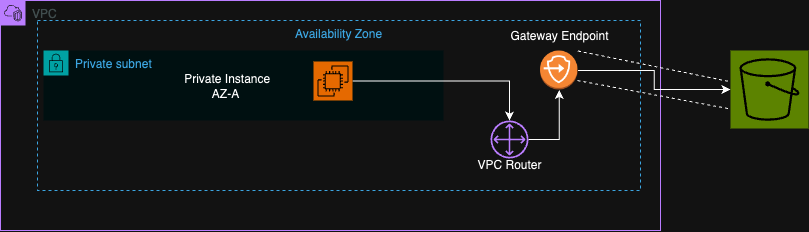
A gateway endpoint is a route table entry that sends S3 traffic directly to S3 via AWS's internal network. No NAT, no internet gateway, no public IPs. Your instance makes an S3 API call, the route table sends it to the endpoint, and S3 responds on the same path.
The best part: gateway endpoints for S3 and DynamoDB are free. You only pay for data transfer.
Setting It Up
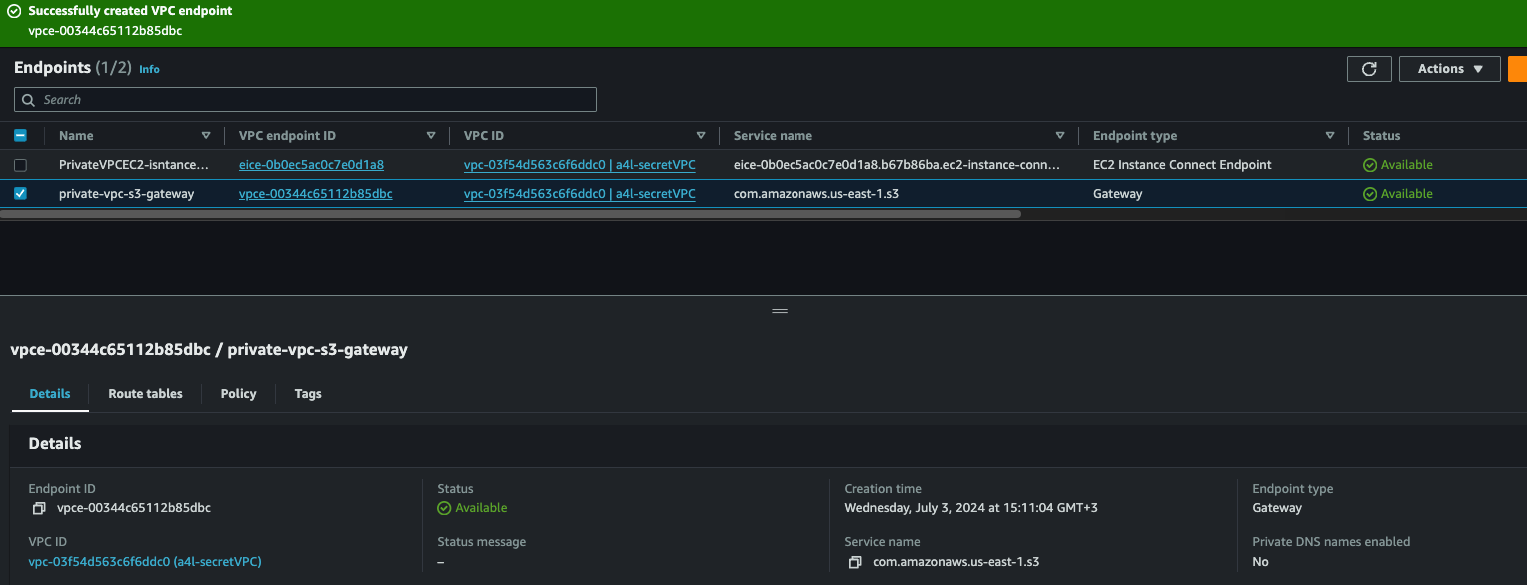
1. Create the endpoint:
VPC Console → Endpoints → Create Endpoint
- Service: com.amazonaws.[region].s3
- VPC: Your VPC
- Route tables: Select the route tables for your private subnets
2. Verify routing:
Check your private subnet's route table. You should see a new route with destination pl-XXXX (S3 prefix list) pointing to the endpoint.
3. Attach IAM role to EC2:
Your instance needs permissions to access S3. Create an IAM role with S3 permissions and attach it to your instance.
For testing, AmazonS3ReadOnlyAccess works. For production, scope it to specific buckets:
{
  "Version": "2012-10-17",
  "Statement": [
    {
      "Effect": "Allow",
      "Action": ["s3:GetObject", "s3:PutObject"],
      "Resource": "arn:aws:s3:::my-bucket/*"
    }
  ]
}
4. Test:
aws s3 ls
aws s3 cp s3://my-bucket/file.txt ./
If this works, your endpoint is configured correctly.
Security Group Consideration
Your instance's security group needs outbound HTTPS (443) to the S3 prefix list. Most security groups allow all outbound, but if yours is locked down, add a rule for the S3 prefix list.
Endpoint Policies
You can restrict what the endpoint allows. Useful for compliance or limiting blast radius:
{
  "Version": "2012-10-17",
  "Statement": [
    {
      "Effect": "Allow",
      "Principal": "*",
      "Action": "s3:*",
      "Resource": [
        "arn:aws:s3:::company-approved-bucket",
        "arn:aws:s3:::company-approved-bucket/*"
      ]
    }
  ]
}
Now even if an instance has broad S3 permissions, the endpoint only allows access to approved buckets.
Why I Use This Everywhere
Cost. NAT gateway charges add up. For S3-heavy workloads, gateway endpoints save real money.
Performance. Traffic stays on AWS backbone. No NAT hop to add latency.
Security. Traffic never touches the internet. Reduces attack surface.
Simplicity. One endpoint serves the entire VPC. No per-instance configuration.
Key Takeaways
- Gateway endpoints for S3 are free - only pay for data transfer
- Create endpoint, associate with route tables, done
- IAM roles on instances handle authentication automatically
- Endpoint policies add another layer of access control
- Always use gateway endpoints for S3 in private subnets - there's no reason not to
Written by Bar Tsveker
Senior CloudOps Engineer specializing in AWS, Terraform, and infrastructure automation.
Thanks for reading! Have questions or feedback?