Royal TSX: Managing SSH, RDP, and VNC in One Place
How I organize hundreds of server connections with encrypted credentials and protocol support for SSH, RDP, VNC, and SFTP.
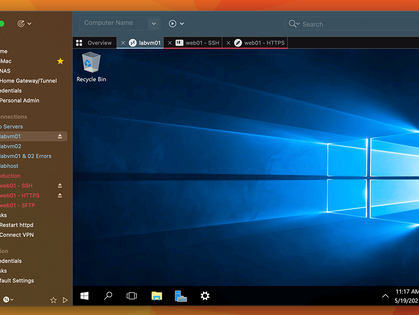
When you're managing dozens of servers across different environments, keeping track of connections gets messy. Royal TSX consolidates everything - SSH, RDP, VNC, SFTP - into one application with encrypted credential storage.
Why I Use It
One place for everything. SSH to Linux, RDP to Windows, VNC to network devices. All in the same app with the same interface.
Organized by environment. I structure folders by client/project, then by environment (dev, staging, prod). Finding a specific server takes seconds.
Credentials stay secure. Royal TSX integrates with 1Password, LastPass, and KeePass. Credentials live in my existing vault, not duplicated in another tool.
Tab-based interface. Multiple connections open simultaneously, switch between them like browser tabs.
How I Organize Connections
├── Client A
│   ├── Production
│   │   ├── web-prod-01 (SSH)
│   │   ├── db-prod-01 (SSH)
│   │   └── jump-host (SSH)
│   └── Staging
│       └── web-staging-01 (SSH)
├── Client B
│   └── Windows Servers
│       ├── app-server-01 (RDP)
│       └── file-server (RDP)
└── Network Devices
    ├── core-switch (VNC)
    └── firewall (SSH)
Folders, tags, and search make navigation fast.
Credential Integration
I don't store passwords in Royal TSX. It connects to my 1Password vault and pulls credentials when connecting. One source of truth for secrets.
Scripting
Royal TSX supports automation. I have scripts for:
- Connecting to all servers in a folder simultaneously
- Running the same command across multiple hosts
- Scheduled connection checks
Useful for maintenance windows or bulk operations.
The Alternative
Before Royal TSX, I had:
- Terminal tabs for SSH
- Microsoft Remote Desktop for Windows
- VNC Viewer for network devices
- Scattered credentials
Now it's all in one place.
Availability
Royal TSX is for macOS. There's a Windows version called Royal TS.
Key Takeaways
- Consolidates SSH, RDP, VNC, SFTP in one application
- Folder organization mirrors infrastructure structure
- Integrates with password managers - no duplicate credential storage
- Tab-based interface for multiple simultaneous connections
- Scripting support for bulk operations
- Available for both macOS and Windows
Written by Bar Tsveker
Senior CloudOps Engineer specializing in AWS, Terraform, and infrastructure automation.
Thanks for reading! Have questions or feedback?