NAT Instances: Cutting AWS Costs by 70%
How I replaced NAT Gateways with EC2 NAT instances in dev environments and saved hundreds per month.
NAT Gateway pricing surprised me the first time I saw the bill. $0.045/hour plus $0.045/GB processed. A single gateway handling moderate traffic costs nearly $80/month - almost $1000/year.
For production, that's fine. For dev environments and staging, it's expensive for what you get.
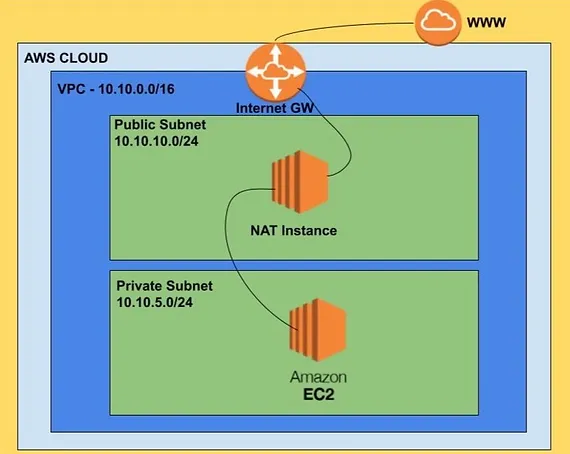
I replaced NAT Gateways with NAT instances in non-production environments. Same functionality, 70% less cost.
The Math
NAT Gateway (1TB monthly traffic):
- Hours: 730 × $0.045 = $32.85
- Data: 1,024 GB × $0.045 = $46.08
- Monthly: $78.93
NAT Instance (t3.micro reserved):
- Instance: ~$5/month reserved
- Monthly: ~$5
Annual savings: Over $800 per NAT Gateway replaced.
When to Use NAT Instances
Good fit:
- Dev/staging environments
- Low-traffic workloads
- Cost-sensitive projects
- Environments where brief outages are acceptable
Stick with NAT Gateway:
- Production with SLA requirements
- High-throughput workloads
- When you can't tolerate single points of failure
Setup
1. Launch the NAT instance:
Search for "amzn-ami-vpc-nat" in Community AMIs. Launch it in a public subnet with a public IP.
2. Disable source/destination check:
This is the step everyone forgets. By default, EC2 drops traffic where the instance isn't the source or destination. NAT instances forward traffic, so this check must be disabled.
EC2 Console → Select instance → Actions → Networking → Change source/destination check → Stop
3. Update private subnet routing:
Add a route in your private subnet's route table:
- Destination:
0.0.0.0/0 - Target: NAT instance ID
4. Configure security group:
Allow inbound from your private subnet CIDR on the protocols your instances need (typically all traffic or HTTP/HTTPS).
Testing
SSH to a private instance (through the NAT instance or Session Manager) and test outbound:
ping 8.8.8.8
curl https://example.com
If it works, your NAT instance is routing correctly.
Making It More Reliable
A single NAT instance is a single point of failure. For non-production, I accept this. For semi-critical workloads, I add:
Auto-recovery: CloudWatch alarm that reboots the instance if health checks fail.
Multiple NAT instances: One per AZ with route table updates on failure. More complex but eliminates the single point of failure.
Spot instances: For dev environments, I've run NAT on spot. Interruptions are rare and the savings are significant.
Gotchas
Instance size matters. Network throughput scales with instance size. A t3.micro handles light traffic. For more bandwidth, use t3.small or larger.
No automatic failover. Unlike NAT Gateway, if the instance dies, traffic stops until it recovers or you update routes.
You manage patches. The NAT AMI needs occasional updates. I schedule monthly patching.
Key Takeaways
- NAT Gateways cost $0.045/hour + $0.045/GB - adds up fast
- NAT instances can cut costs 70%+ for non-production workloads
- Source/destination check must be disabled or nothing works
- Accept the trade-off: lower cost means less automatic resilience
- Use reserved instances for additional savings on long-running NATs
Written by Bar Tsveker
Senior CloudOps Engineer specializing in AWS, Terraform, and infrastructure automation.
Thanks for reading! Have questions or feedback?