Fixing SFTP Errors with AWS Transfer Family
Why SETSTAT commands fail when using Transfer Family with S3, and the one setting that fixes it.
I migrated an SFTP workflow to AWS Transfer Family backed by S3. Uploads failed with cryptic SETSTAT errors. The SFTP client was trying to preserve file timestamps - something S3 doesn't support.
The Problem
Traditional SFTP servers use filesystems that support POSIX attributes - timestamps, permissions, ownership. When a client uploads a file, it sends SETSTAT to preserve these attributes.
S3 isn't a filesystem. It doesn't have POSIX attributes. Transfer Family with S3 backend receives SETSTAT and returns an error because it can't do what the client is asking.
Some SFTP clients handle this gracefully. Others retry forever or abort the transfer entirely.
The Fix
AWS Transfer Family has a SetStatOption setting. Set it to ENABLE_NO_OP.
This tells Transfer Family to acknowledge SETSTAT commands without actually doing anything. The client thinks the operation succeeded, the transfer completes, and CloudWatch logs the attempt for audit purposes.
How to Configure
In the console:
Transfer Family → Select server → Edit → Find SetStatOption → Set to ENABLE_NO_OP
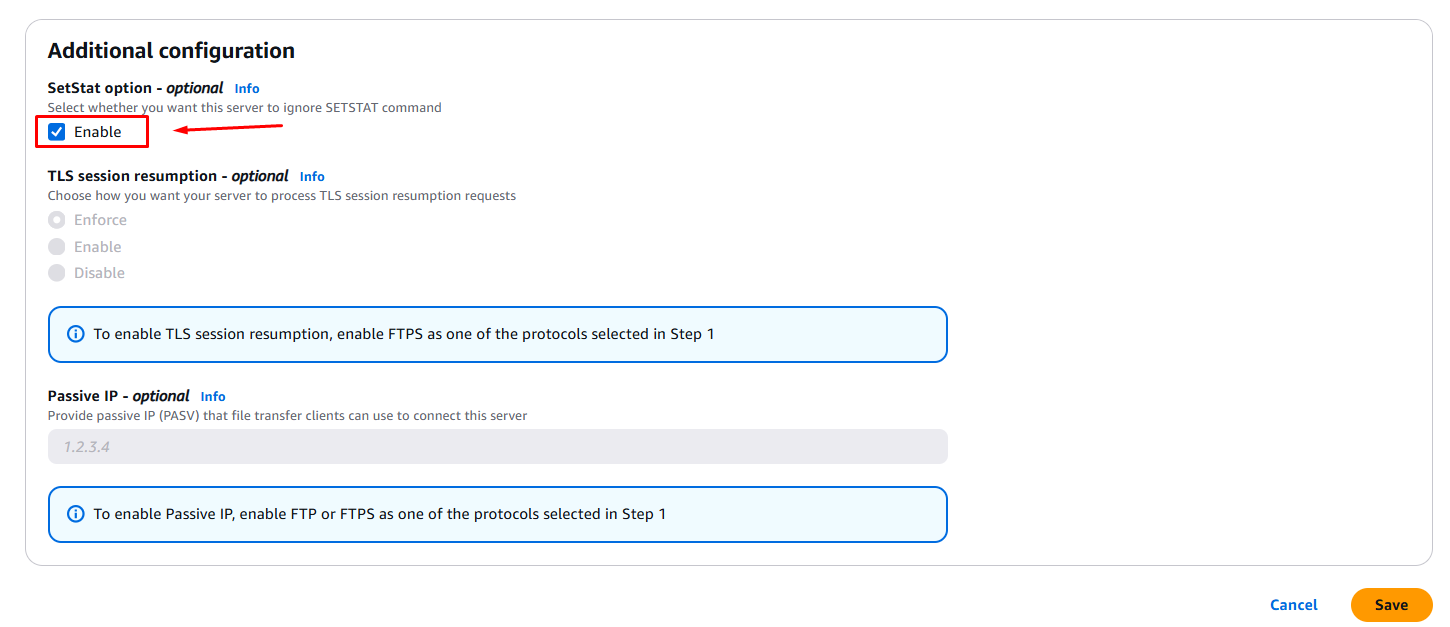
Via CLI:
aws transfer update-server \
  --server-id s-1234567890abcdef0 \
  --protocol-details SetStatOption=ENABLE_NO_OP
Test with your SFTP client after making the change.
When You Actually Need Attributes
If your workflow requires preserved timestamps or permissions, S3 is the wrong backend. Use Amazon EFS instead - it supports full POSIX semantics and handles SETSTAT natively.
The trade-off: EFS costs more and has different performance characteristics. For most file transfer use cases, S3 with ENABLE_NO_OP is fine.
Key Takeaways
- SETSTAT errors happen because S3 doesn't support POSIX file attributes
- Set
SetStatOptiontoENABLE_NO_OPto silently acknowledge these commands - CloudWatch still logs SETSTAT attempts for auditing
- If you genuinely need attribute preservation, switch to EFS backend
- Always test your SFTP workflow after configuration changes
Written by Bar Tsveker
Senior CloudOps Engineer specializing in AWS, Terraform, and infrastructure automation.
Thanks for reading! Have questions or feedback?